Reading the Web's Mind: A Developer's Field Guide to Semrush
You already know how to read a database. Semrush is a query engine over the web's demand and competition — here is how to run a 15-minute competitive teardown, the developer way.

Patrick Roden
Founder, DevForge Academy

You already know how to read this tool
Most "intro to Semrush" articles hand you a tour of buttons. This one hands you a mental model, because you already have the right one — you just haven't pointed it at SEO yet.
If you can read a database, you can read Semrush. A query engine takes a question, runs it against enormous tables, and returns rows. Semrush does exactly that. Its tables are the ones you cannot build yourself: billions of tracked keywords, trillions of backlinks, and a modeled picture of every competitor's traffic. You do not have that data. Semrush rents it to you and gives you a query surface over it.
So stop thinking of it as a marketing dashboard. Think of it as read-only access to the web's demand-and-competition database — and the same instincts that make you good at SELECT ... WHERE ... ORDER BY make you good at this.
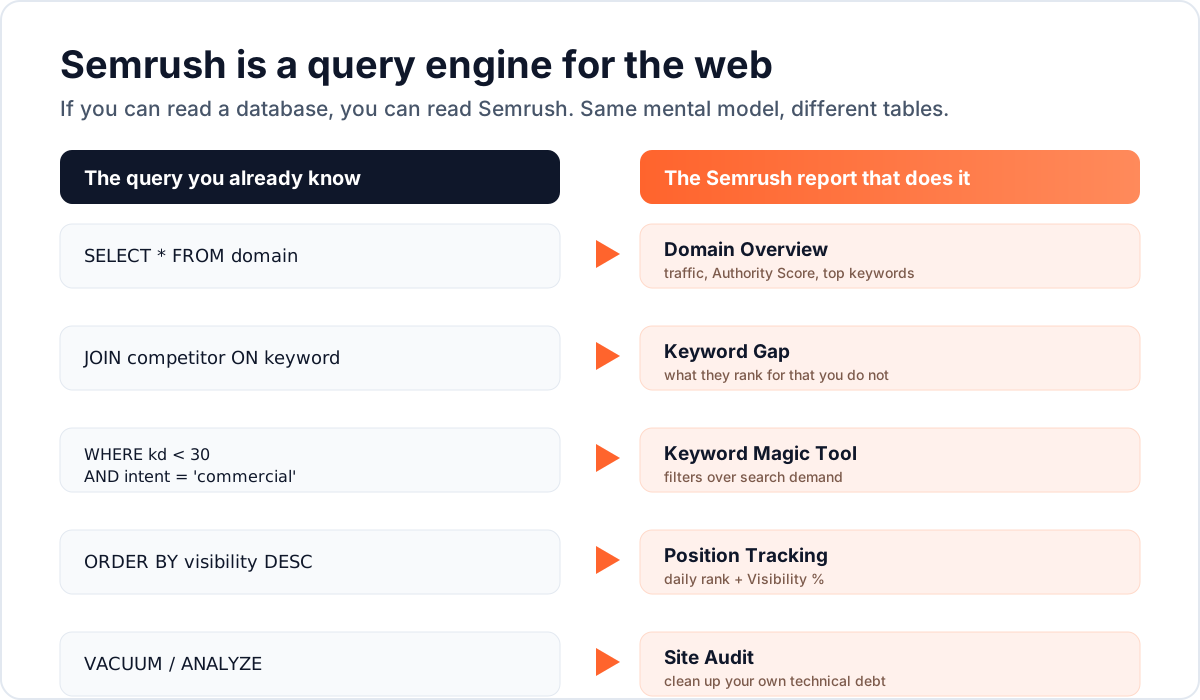
The tables you are querying
Three datasets sit under almost everything Semrush does:
- Keywords — what people type into search, how often (volume), how hard each is to rank for (difficulty), and *why* they're searching (intent).
- Backlinks — who links to whom, how much authority that passes, and which links look natural versus spammy.
- Traffic — a modeled estimate of how much traffic a domain gets and where it comes from.
You will never see the raw rows. What you get instead are reports — pre-joined, pre-aggregated views tuned to a specific question. Learn which report answers which question and you're 80% of the way there. The other 20% is knowing that these numbers are *estimates*, which we'll get to, because misreading them is the single most common rookie mistake.
The 15-minute competitive teardown
Here's the exercise that makes the whole tool click. Pick a competitor — a real one, right now — and run these five reports in order. Each one feeds the next, like a pipeline where every stage's output is the next stage's input.
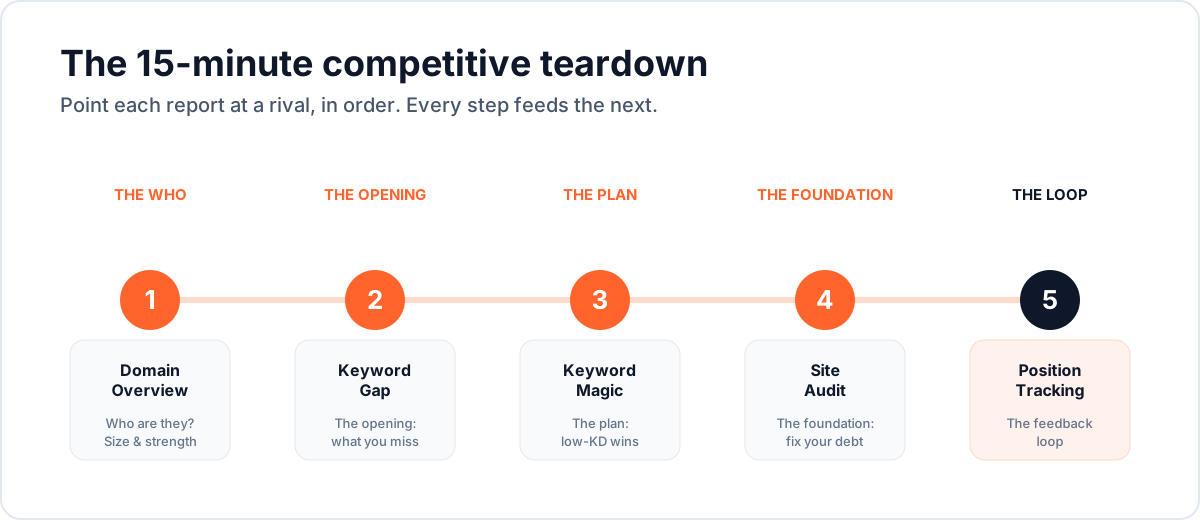
1. Domain Overview — the WHO
Type the competitor's root domain into Domain Overview. In thirty seconds you learn their size and shape: estimated organic traffic, Authority Score, how many keywords they rank for, whether their trend line is climbing or sinking, and who *their* main rivals are.
Read it like a SELECT * FROM domain LIMIT 1 — one row, the summary of everything. You're not looking for detail yet. You're answering one question: *is this a giant I should avoid, or a peer I can outmaneuver?*
The Authority Score is your climb gauge. A rival at 25 is a fair fight. A rival at 75 is a mountain — you'll pick different battles.
2. Keyword Gap — the OPENING
This is the report that turns envy into a to-do list. Keyword Gap compares your domain against up to four competitors and, crucially, opens the Missing tab: keywords they *all* rank for and you rank for *not at all*.
That is a JOIN between your keywords and theirs, filtered to WHERE you_rank IS NULL. The result set is proven demand your rivals already capture and you're leaving on the table. Sort it by volume, keep an eye on difficulty, and you have a content backlog built entirely from evidence rather than guesswork.
3. Keyword Magic — the PLAN
Now go from *what's missing* to *what's winnable*. The Keyword Magic Tool takes one seed term and explodes it into millions of related keywords, clustered by topic, each tagged with volume, difficulty, intent, and cost-per-click.
Its filters are a query language. Think of it exactly like a WHERE clause:
-- find winnable, high-value terms from a seed
seed = "email marketing"
WHERE keyword_difficulty < 30
  AND search_volume > 200
  AND intent IN ('commercial', 'transactional')
  AND keyword LIKE '%software%'
Two dials do most of the work here: intent and difficulty. Get them wrong and you'll write the perfect article that ranks for nothing, or ranks for something that never converts.
Intent is *why* someone searches. Semrush sorts every query into four types, and each one can only be won by a matching content type:
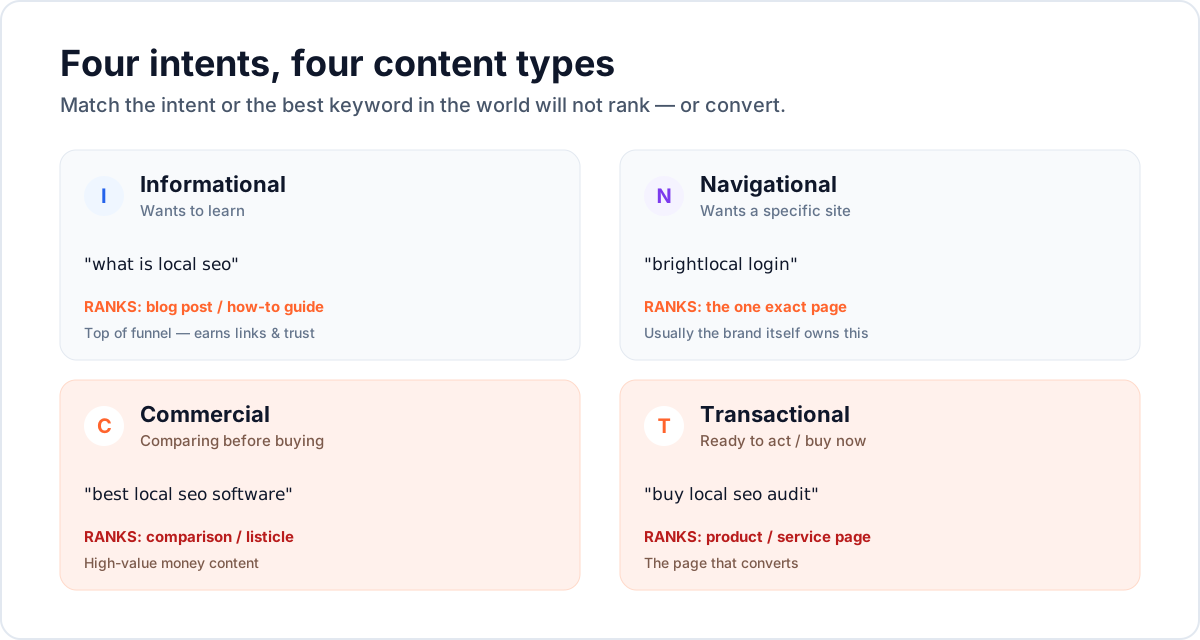
Difficulty (KD%) is *how hard* the term is to rank for organically — driven mostly by how strong the pages already ranking are. Read the band, not the raw number:
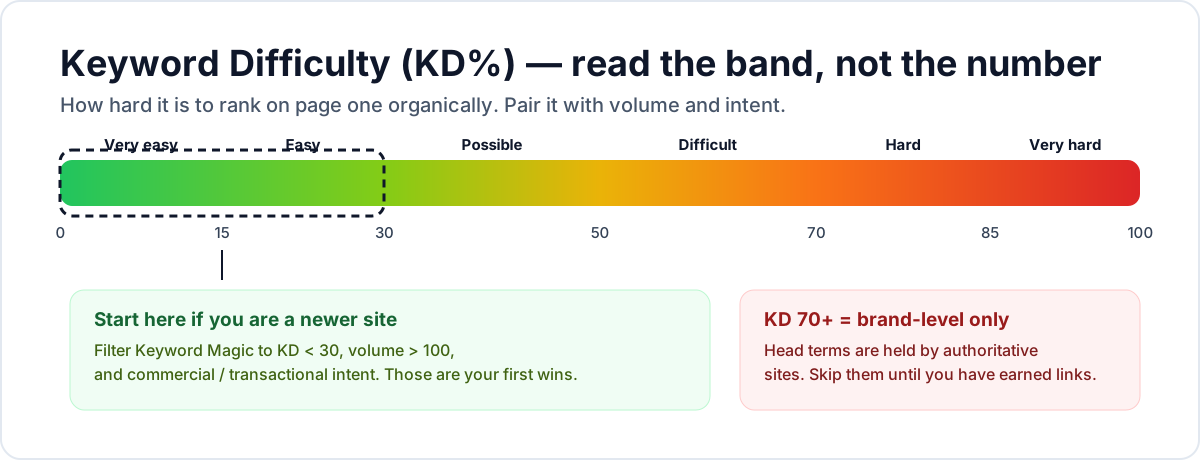
If your site is young, live below KD 30 for a while. You'll rank, you'll earn links, your Authority Score will climb — and *then* the harder terms come into range. Chasing a KD 80 head term on a new domain is like running a full-table scan on an unindexed billion-row table: technically allowed, practically hopeless.
4. Site Audit — the FOUNDATION
Before you pour content onto your site, make sure the site can hold it. Site Audit crawls your domain, checks 140+ technical issues, and returns a 0-100 Site Health score with everything ranked as Errors, Warnings, or Notices.
Triage like a bug tracker — Errors are the crashes:
- Errors first — broken links, 4xx/5xx pages, pages accidentally blocked from indexing, duplicate title tags.
- Warnings next — slow pages and Core Web Vitals, missing alt text, thin content.
- Notices last — nice-to-haves.
Fix, re-crawl, watch the score climb. This is the least glamorous step and the one that quietly decides whether all your other work indexes at all.
5. Position Tracking — the FEEDBACK LOOP
Finally, close the loop. Position Tracking watches a fixed list of your target keywords every day, by device and location, and rolls it all into one number: Visibility % — your aggregate share of clicks across those keywords.
This is your test suite for SEO. A single ranking is noisy; Visibility % over weeks is signal. Check it weekly, judge it monthly, and resist the urge to react to daily wobble — search rankings move slowly, and most day-to-day movement is jitter, not a regression.
The three numbers everyone misreads
Here's the part that separates people who *use* Semrush from people who get *fooled* by it. Three of its headline numbers are models, not measurements — and treating them as ground truth is how you lose an argument with a client or a boss who checks your work.
- Authority Score is a *Semrush* metric, not a Google one. It's a great comparative yardstick between two domains. It is not "our score with Google." Never present it as one.
- Keyword Difficulty estimates competition from the pages currently ranking. It's directional. A KD of 34 versus 36 is not a meaningful difference; a KD of 20 versus 60 absolutely is.
- Traffic estimates are modeled from rankings × volume × click-through rate, plus clickstream panels. Semrush cannot see a competitor's real analytics. Use the numbers to *compare* domains and spot *trends*, never to quote a rival's exact visitor count.
Rule of thumb: Semrush is excellent at *relative* and *directional*. It is not *absolute* and *exact*. Build every decision on the first pair and you'll rarely be wrong.
Your first hour, as a checklist
- Run Domain Overview on yourself and your two closest competitors. Write down all three Authority Scores.
- Run Keyword Gap, open the Missing tab, export the top 50 by volume.
- In Keyword Magic, filter that list to KD < 30 and commercial or transactional intent. That subset is your first content sprint.
- Run Site Audit on your own domain. Fix every Error this week.
- Set up Position Tracking on your 20 most important keywords. Ignore it for a month, then read the trend.
That's a complete, evidence-based SEO plan in about an hour — assembled the same way you'd profile a slow service: measure, find the bottleneck, fix the highest-leverage thing, watch the metric.
Practice it, don't just read it
Reading about a query language never made anyone fluent. Go run the queries:
- Drill the reports and metrics in the Semrush exercises.
- Test your recall with the Semrush quiz.
- Keep the Semrush reference glossary open while you work.
Point the tool at a real competitor today. The web's demand data is sitting right there in the tables — all you have to do is read it.
---
*Semrush® is a registered trademark of Semrush Holdings, Inc. DevForge Academy is an independent educational platform and is not affiliated with, endorsed by, or sponsored by Semrush. All product names, logos, and brands are the property of their respective owners and are referenced here for identification and educational purposes only. See our full disclaimers and trademark notices.*